
Quick Tools
One answer in ten seconds.
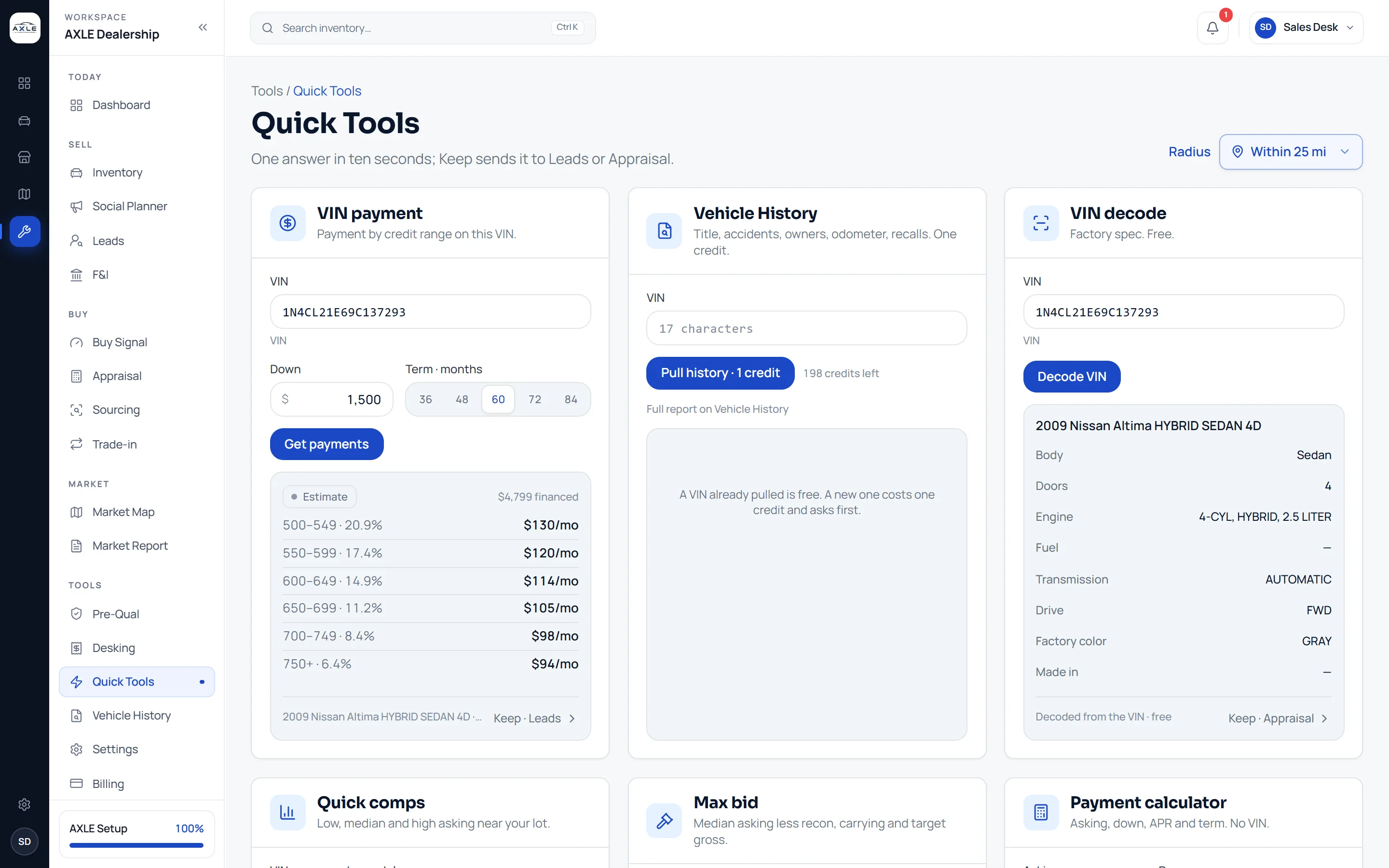
Quick Tools puts six small tools on one screen for the questions that come up on the phone or on the lot: what would this car cost a month, what is it, what is it worth around here, and the most to pay for it. Keep any answer to Leads or Appraisal.
Small questions should not need a full workflow.
A caller asks what a car would cost a month. A wholesaler offers a car and wants a number. A customer arrives with a VIN on their phone. Each question is small, but opening the full workflow for every one slows the answer down.
Quick Tools answers them in place. Type a VIN or a year, make and model, get the answer, and move on, or keep it to Leads or Appraisal if it turns into something more.
Quick Tools: what it gives your team.
VIN payment
The estimated payment at every credit range for a VIN, from its asking price or the local median.
Vehicle history
Pull history for a VIN; one already on file is free, a new one asks before it uses a credit.
VIN decode
Body, engine, fuel, transmission, drive, factory colour and where it was made. Free.
Quick comps
Low, median and high asking near your lot for a VIN or a year, make and model.
Max bid
Median asking less recon, carrying and target gross, with each line shown.
Payment calculator
Asking, down payment, APR and term, with no VIN needed.
From question to next step.
- 01
Pick the tool
All six are on one screen; each starts empty.
- 02
Type the car
A VIN, or a year, make and model, and press Enter.
- 03
Read the answer
Each tool shows its result and what it was based on.
- 04
Keep it if it matters
Send the answer to Leads or Appraisal; otherwise nothing is saved.
Built for the people who run the lot.
Sales staff
Answer the payment question on the phone without opening a deal.
Buyers
Put a number on a car offered to you in seconds.
Managers
Check a figure a colleague quoted without leaving the page you are on.
Quick Tools: common questions.
Estimate only. Payments are illustrations based on the figures entered and the dealer's starting rate for the selected credit range. They exclude tax, title, licence and fees unless shown. This is not an offer or approval of credit and not a credit application. No credit check was run. Final terms are set by the lender and disclosed in writing before you sign. Axle is not a lender.
Does the VIN payment check credit?
No. It shows estimated payments at each credit range from your starting rates.
Is anything saved?
Only what you choose to keep to Leads or Appraisal.
Where do the rates come from?
From the starting rates you set for each credit range in Settings.
Does VIN decode cost a credit?
No. VIN decode is free; only a new vehicle history report uses a credit.
Works with
Your next step