Vehicle history reports
The car’s history, before you buy or sell it.
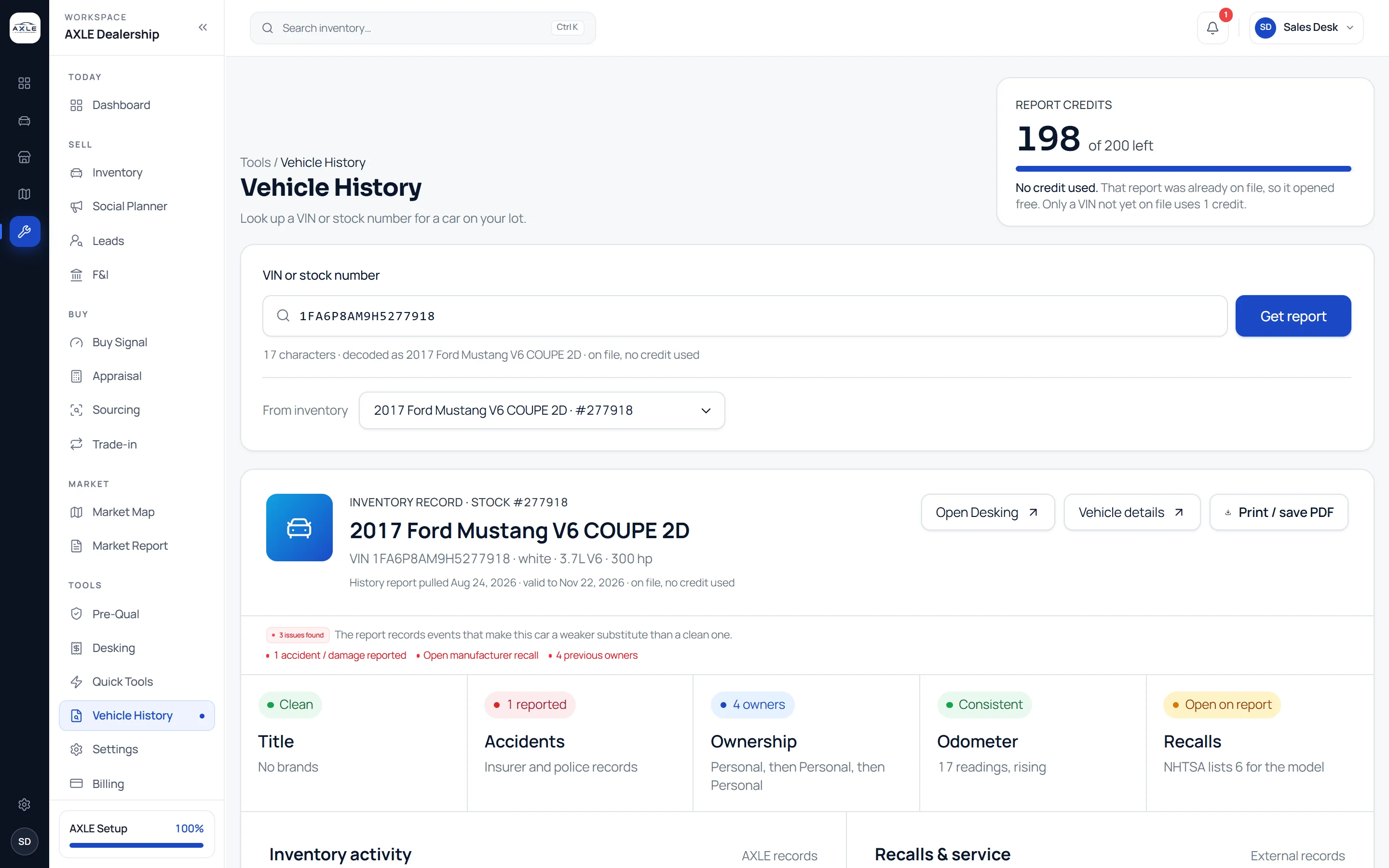
Look up any VIN or a stock number from your lot. AXLE shows title and brand records, accidents and damage, ownership, odometer readings and recalls in one report, and a report already on file opens again without using a credit.
History you check too late costs the most.
A branded title or an odometer discrepancy found after purchase is expensive, and one found after the car is listed is worse. Checking history at every step, at appraisal, before the listing and when the buyer asks, is easy to skip when each check is a separate login and a separate charge.
AXLE puts vehicle history on the same page as the car. Reports are pulled once and kept, so checking again is free, and the summary appears wherever the car does.
Vehicle history reports: what it gives your team.
Title and brands
Brand records such as salvage, rebuilt or flood, where the provider reports them.
Accidents and damage
Reported accidents and damage events, with the number of each.
Ownership
How many owners the car has had and the type of each.
Odometer
Recorded readings over time, so a rollback or gap stands out.
Recalls
Recalls from NHTSA data for the model line, with a reminder to confirm by VIN.
Credits you can see
Your remaining monthly reports are shown before you pull, and a new report always asks first.
From question to next step.
- 01
Enter the VIN
Or pick a car from your inventory by stock number.
- 02
Open the report
A report on file opens free; a new one asks before it uses a credit.
- 03
Read the summary
Title, accidents, owners, odometer and recalls at a glance, with the detail below.
- 04
Save or share
Print or save the report as a PDF for your deal file.
Built for the people who run the lot.
Buyers
Check history before the bid, not after the purchase.
Sales staff
Answer the buyer’s history questions from the car’s own page.
Compliance leads
Keep a saved report in the deal file for every car.
Vehicle history reports: common questions.
Vehicle history is supplied by a third-party provider and NHTSA public data. It is a research tool, not a certified title history and not a consumer report under the Fair Credit Reporting Act. Records can be missing or wrong. Confirm title and brand status with your state DMV or an NMVTIS report, and confirm recall repair status by VIN at nhtsa.gov/recalls before relying on it. Recalls shown are listed by model line, not confirmed for this specific vehicle.
How many reports are included?
Starter includes 50 a month and Professional 200. A report already on file reopens free.
Is this a Carfax report?
Reports come from a third-party vehicle history provider and NHTSA data. They are research tools, not certified title histories.
Can I pull history for a car I do not own?
Yes. Any VIN can be looked up, for example a car you are appraising.
Are recalls confirmed for the specific car?
No. Recalls are listed by model line; confirm repair status by VIN with NHTSA.
Works with
Your next step