
Comparable vehicle pricing
Comparable cars, not a median you have to trust.
AXLE builds the comparison set for one car from the same nameplate within a model-year window, a mileage band and a radius you control. Every comp is listed, so you can see exactly what the price position is based on.
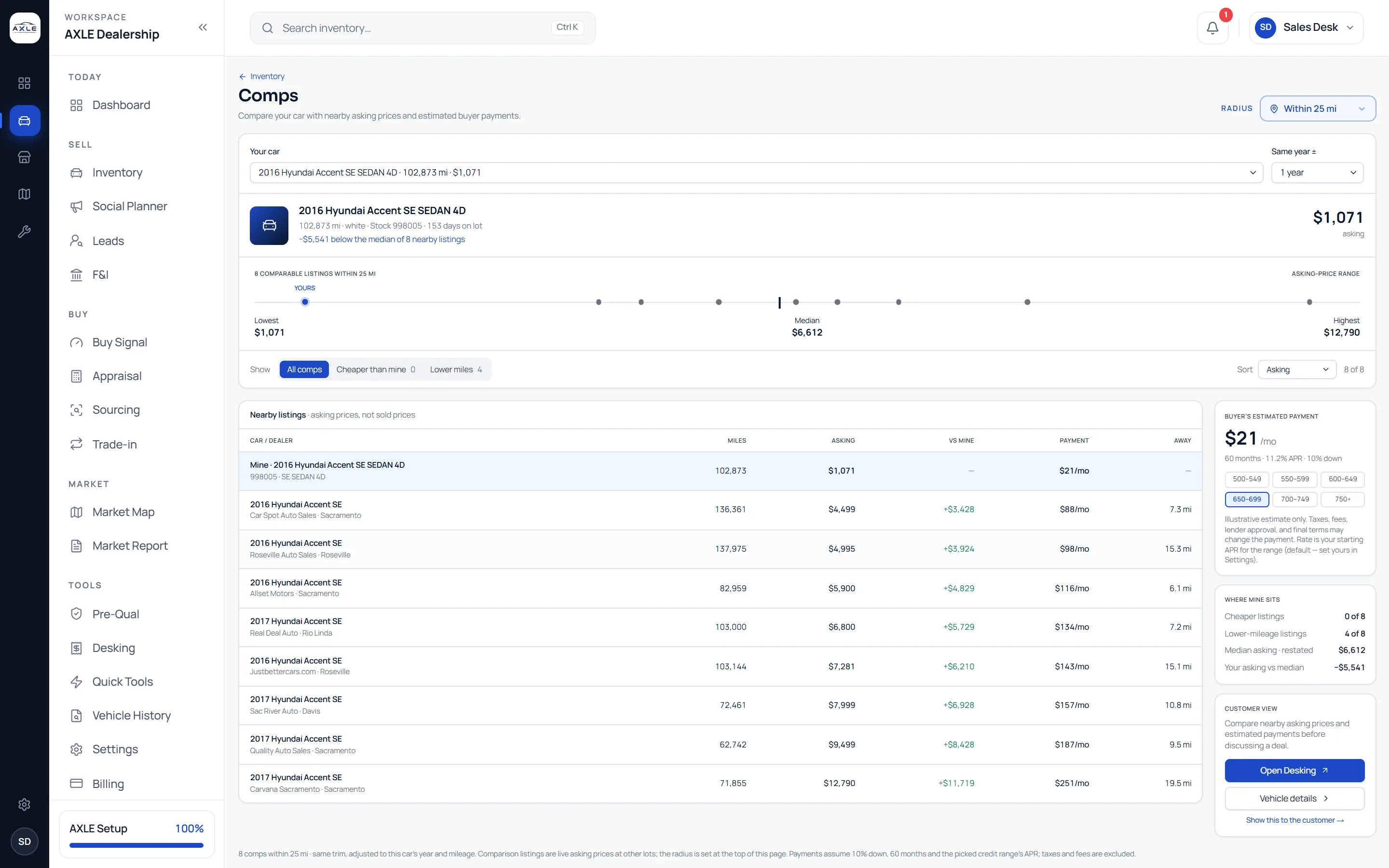
A median is only as good as the cars behind it.
A single "market value" number hides the decisions that produced it: which cars were counted, how far away they were, whether their mileage and trim were anything like yours. When a figure looks wrong there is nothing to inspect, and when it looks right there is no way to explain it to a customer or a colleague.
Comparable vehicle pricing in AXLE keeps the set visible. You choose how strict it is, you see every car in it, and the position of your car follows from that set: cheapest in the radius, in the middle, or priced above everything nearby.
Comparable vehicle pricing: what it gives your team.
A strict comparison set
Comps share your car’s nameplate, sit within a model-year window, a mileage band and, when you choose, the same trim, all inside your radius.
Low, median and high
A range bar places your asking price among the comps, so the gap to the median is a number you can read, not a feeling.
Your rank in the set
See where your car falls, for example first of ten within 25 miles, and how many comps are cheaper or carry fewer miles.
Every comp on the page
Each comparable listing shows its lot, distance, mileage, asking and price difference, so a surprising result can be checked in seconds.
Payment beside price
An estimated monthly payment at each credit range sits next to the comps, so price and payment can be talked about together.
A comparison to share
Open a VIN-specific comparison the customer can read, showing your car beside the similar cars around you.
From question to next step.
- 01
Pick the car
Choose a car from your lot or arrive from Inventory, Market Map or Appraisal with the car already selected.
- 02
Set how strict the comparison is
Adjust the year window, mileage band, trim and radius. The set and the price position update as you change them.
- 03
Check the set
Read the comps themselves. Remove any doubt about outliers before you rely on the median.
- 04
Decide and record
Reprice in Inventory, carry the figures into Desking, or share the comparison with the buyer.
Built for the people who run the lot.
Pricing managers
Price from a set you can defend, and reprice the same way every week.
Sales staff
Show a buyer how the car compares with the alternatives nearby instead of asserting that it is a good price.
Owners
Spot the cars priced above every comparable car around you before they age on the lot.
Comparable vehicle pricing: common questions.
Market data is compiled from public listings and third-party sources and may be incomplete, delayed or wrong. Prices, scores and recommendations are informational, not an appraisal or valuation. Verify before you buy, price or sell.
How many comps does AXLE need?
A comparison works best with four or more like-for-like cars. With fewer, AXLE shows what it found and marks the set as thin rather than inventing a figure.
Can I loosen the comparison?
Yes. The year window, mileage band, trim and radius are yours to set, and the same settings are used in Inventory.
Is the payment a credit offer?
No. It is an estimate from the asking price and your starting rate for each credit range. No credit check is involved.
Can a customer see the comparison?
You can open a VIN-specific comparison for the customer. You decide when and whether to share it.
Works with
Solutions that use it
Your next step