
Market intelligence
Your market, every lot on one map.
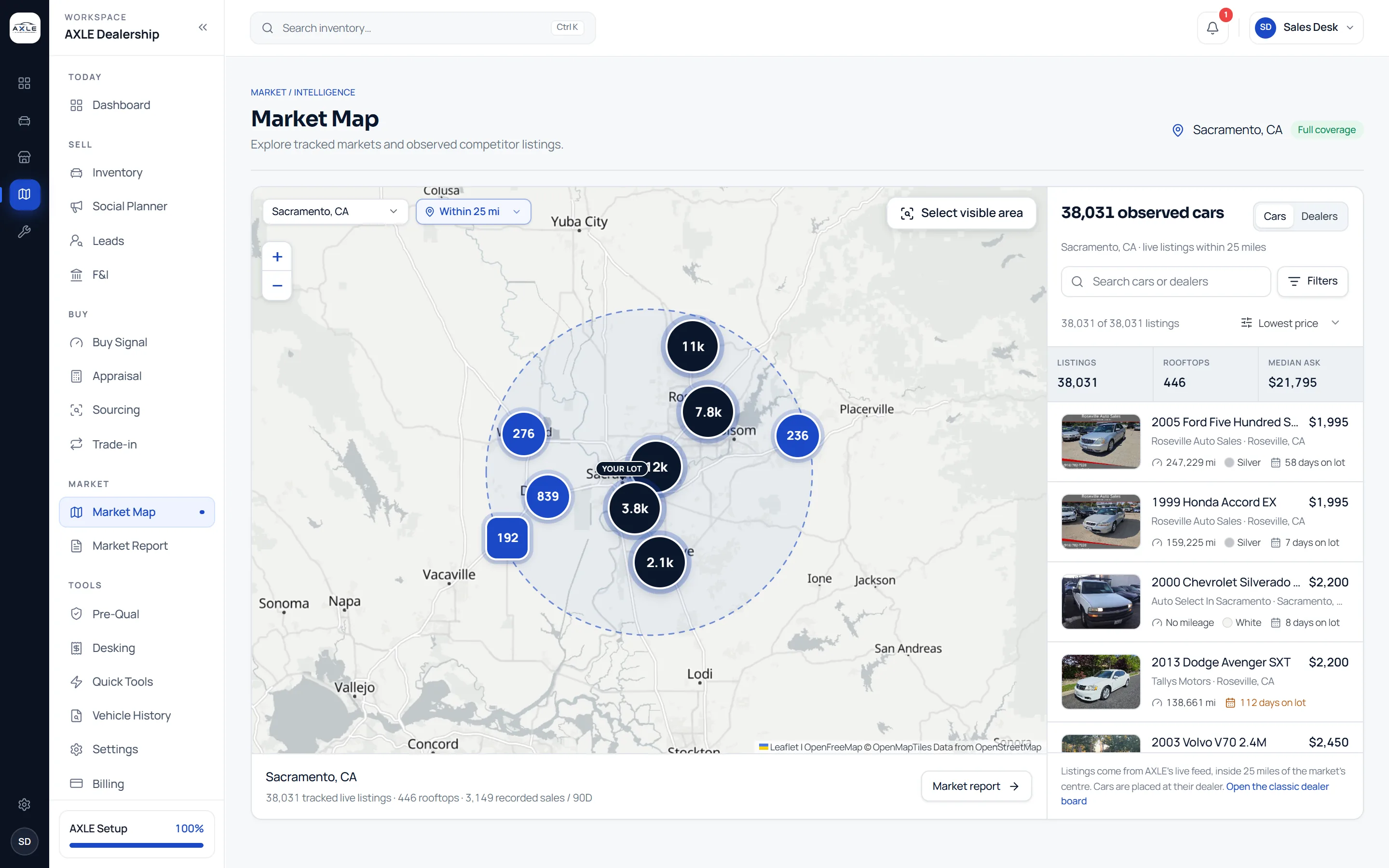
AXLE reads public dealer listings around your rooftop and places each car at the lot that is selling it. You see how deep the market is, who is holding what, and where your own asking prices sit, without opening ten listing sites.
Pricing in the dark costs more than a subscription.
Most independent dealers check the market one car at a time: a search on a listing site, a scroll through results, a guess at which of them are really comparable. It is slow, it is different every time someone else does it, and it says nothing about the market as a whole: how many rivals are carrying the same model, whether asking prices for it are rising or falling, or which lots are sitting on the cheapest stock.
Market intelligence in AXLE starts from the other end. It reads the market first, then lets you drill down to the single car. The question "what is this worth?" becomes "what is everyone around me asking, and how is that changing?", and that answer is the same for everyone on your team.
Market intelligence: what it gives your team.
A map of every observed lot
Listings are grouped at the rooftop that advertises them, inside a radius you choose: 10, 25 or 50 miles, or a custom distance. Clusters show how much stock each part of town holds, and a rooftop opens its own cars.
Asking against the local median
Each listing is compared with the same nameplate around it, so you can tell at a glance whether a car is priced under, near or over what other lots ask for it.
Filters with live counts
Narrow by make, model, year, mileage, price, body and more. Every filter shows how many cars it would leave before you click, so you never run a search that comes back empty.
Competitors you track
Add the rooftops you watch most closely and their lots are outlined on the map and in the list, so a rival’s new arrivals and price cuts are easy to spot.
Market Report
A period-over-period view of median asking prices by model: the biggest movers up and down, how many models moved, and which of your own units sit on a model whose market fell three percent or more while your ask stayed above it.
More than one market
Look at any market AXLE tracks, not only your own, and compare up to five side by side in Market Expansion before you buy stock for a new area.
From question to next step.
- 01
Choose a market and a radius
AXLE opens on the tracked market nearest your rooftop at 25 miles. Change either and the map, list and figures follow.
- 02
Read the shape of the market
Listings, rooftops and the median ask sit above the list. The map shows where the stock is concentrated and which lots hold the most of it.
- 03
Narrow to what you sell
Filter to the segment you are pricing or buying, or select the visible area of the map to cut the list to a neighbourhood.
- 04
Act on what you found
Open a car for its detail, a dealer for its whole lot, or the Market Report for the models that are moving, and carry the car into pricing or appraisal.
Built for the people who run the lot.
Owners
Know how crowded your market is in the segments you stock, and whether the lots around you are cutting or holding price.
Pricing managers
Start every pricing review from the same picture of the market instead of a fresh search on someone else’s site.
Buyers
See which models are thin around you before you bid on another one at auction.
Market intelligence: common questions.
Market data is compiled from public listings and third-party sources and may be incomplete, delayed or wrong. Prices, scores and recommendations are informational, not an appraisal or valuation. Verify before you buy, price or sell.
Is this the same as a valuation guide?
No. AXLE shows observed asking prices from public listings and how they compare. It is market context for your own decision, not an appraisal, a valuation or a book value.
Which markets can I see?
Any market AXLE tracks. The picker lists them with their coverage, and your nearest market opens by default.
How current is the data?
Prepared markets are refreshed through the day and the page shows when the feed was last read. If a source stops updating, the page says so instead of presenting old figures as current.
Can I see my competitors specifically?
Yes. Add the rooftops you track and they are highlighted on the map and in the list.
Works with
Solutions that use it
Your next step