
Dealer CRM & leads
Every lead, by car, with the next step attached.
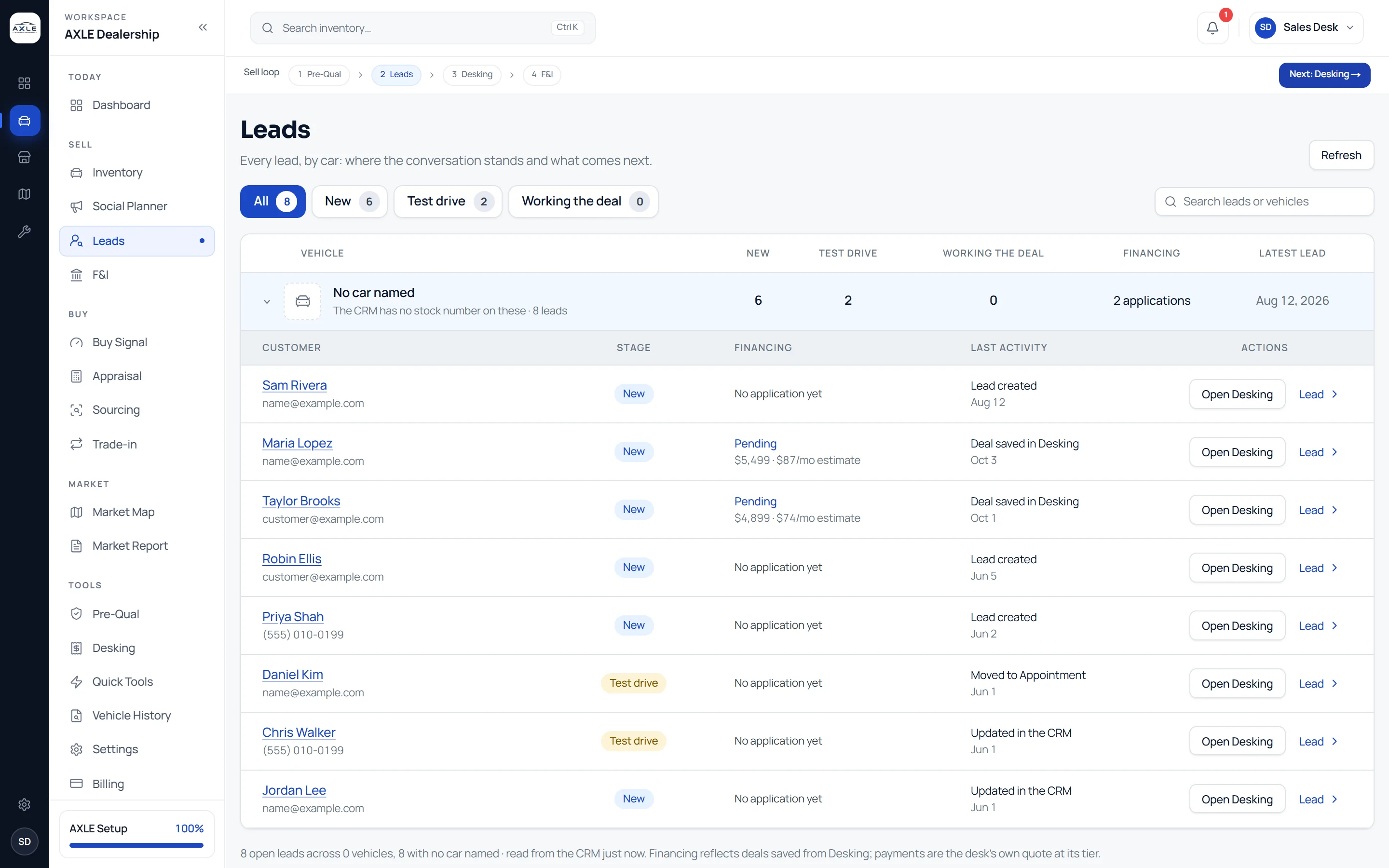
AXLE reads your leads from your CRM and organises them around the vehicle each buyer is asking about. Where a conversation stands, what payment the desk quoted and what happens next are on one row.
A lead without its car is a conversation that starts again.
When leads live in one system and inventory in another, every follow-up begins with the same questions: which car was it, what did we quote, who spoke to them last? Buyers notice when they have to repeat themselves, and a busy desk loses track of the warm conversations in a list of cold ones.
AXLE groups leads by the vehicle they belong to and keeps the deal context with them. Open a lead and the car, the stage and the payment the desk estimated are already there; open the desk from the lead and the buyer comes with it.
Dealer CRM & leads: what it gives your team.
Leads by vehicle
Every open lead is grouped under the car the buyer asked about, so you can see which cars draw interest and which draw none.
Clear stages
New, Test drive and Working the deal, read from your CRM, with counts for each so the day’s follow-ups are obvious.
The deal on the lead
When the desk saves a deal to a customer, its price and estimated payment appear on that customer’s lead.
One click to the desk
Open Desking from any lead with the buyer attached and the car selected, instead of re-entering either.
Shopper payment estimates
A pre-qualification link for your website lets shoppers pick a credit range and see an estimated payment. Their request lands in your leads. No credit is checked.
Texting with consent
Messages go out through your CRM with the shopper’s recorded consent and standard opt-out handling.
From question to next step.
- 01
Connect your CRM
AXLE reads leads and their stages from your connected CRM; nothing is re-typed.
- 02
Work the list by car
See which cars have new leads, which have buyers waiting on a test drive and which deals are in progress.
- 03
Quote from the desk
Open Desking from the lead, build the estimate and save it back to the customer.
- 04
Follow up with context
The next person to pick up the lead sees the car, the stage and the last quote.
Built for the people who run the lot.
Sales staff
Pick up any lead with the car and the last quote already in front of you.
Sales managers
See which cars attract buyers and which conversations have stalled.
Owners
Know how many open opportunities sit behind the stock on the lot.
Dealer CRM & leads: common questions.
Which CRM does AXLE work with?
AXLE reads leads from the CRM connected to your account. Ask us during onboarding about the CRM your store uses.
Does AXLE take credit applications?
No. AXLE is not a lender and does not take credit applications. Payments shown are estimates; financing happens through your own credit provider.
What does a shopper see on the pre-qualification link?
They choose a car and a credit range and see an estimated payment. Their request is sent to you as a lead. Nothing on the page checks their credit.
Are customer details visible to everyone?
Only to the authorised staff of your dealership.
Works with
Solutions that use it
Your next step